Fusions Bazar
Samsung Galaxy Watch 8 With Samsung Logo | 7 Day Replacement
Samsung Galaxy Watch 8 With Samsung Logo | 7 Day Replacement

Couldn't load pickup availability
 7 days Return
 Quality product
 Free Shipping


Samsung Galaxy Watch 8 (Black) – Basic Functions & Controls
Buttons & Controls
Home/Power Button (Upper Button)
-
Press and hold: Power on/off, or launch Bixby/Google Assistant (if set).
-
Single press: Go to the Home screen or open Apps.
-
Double press: Launch a chosen shortcut (default is Recent Apps or app of your choice).
Back Button (Lower Button)
-
Single press: Return to previous screen.
-
Press and hold: Emergency SOS (if enabled).
Rotating Touch Bezel
-
Rotate clockwise/counterclockwise: Scroll through lists, widgets, notifications, or settings.
Gestures & Navigation
Swipe Left
-
View health and activity widgets (heart rate, steps, workouts, sleep, etc.).
Swipe Right
-
Return to previous app or open Tiles depending on your layout.
Swipe Up
-
View your Apps screen.
Swipe Down
-
Open the Quick Panel (Wi-Fi, Bluetooth, Do Not Disturb, Brightness, etc.).
Press & Hold the Watch Face
-
Change or customize watch faces.
App Installation & Connectivity
Required Apps
To set up and manage the watch:
-
Galaxy Wearable (Samsung Gear App)
-
Samsung Health
-
(Optional) Google Assistant, Spotify, Google Wallet, etc.
First-Time Setup
-
Turn on your Galaxy Watch 8.
-
A pairing screen with a QR code appears.
-
On your phone:
-
Open Galaxy Wearable → Add New Device
-
Scan the QR code or select “Galaxy Watch 8” from the device list.
-
-
Complete setup through the app.
General Reconnection
If pairing again or connecting a new phone:
-
Open Galaxy Wearable → Connect to New Device.
-
Reset the watch if required (the app will prompt you).
-
Pair using Bluetooth and follow on-screen instructions.
Bluetooth Calls & Audio
To Enable Calling
-
On the watch:
Settings → Connections → Bluetooth → Phone → On -
On your phone, ensure both:
-
Bluetooth (Watch)
-
Bluetooth (Watch LE / Calls)
are connected.
-
Once Connected, You Can:
-
Make or receive calls from the watch.
-
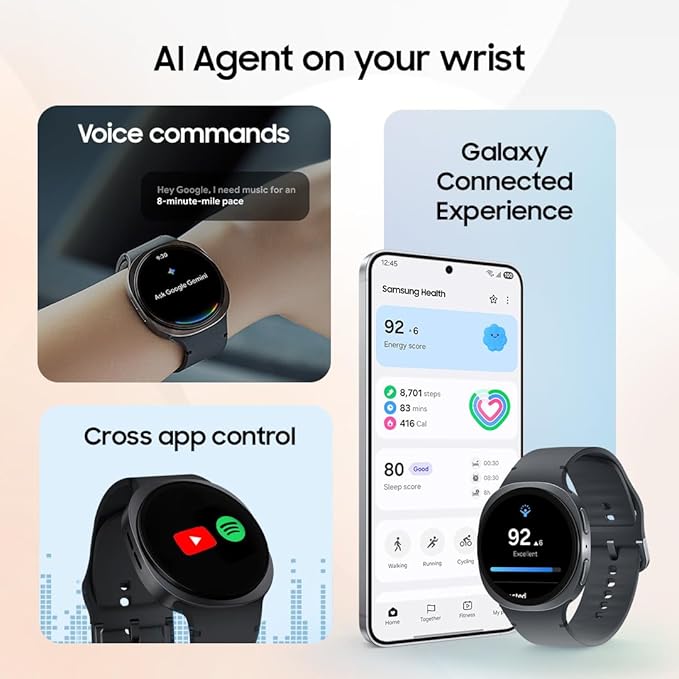
Play music through the watch or connected earbuds.
-
Use Bixby or Google Assistant with your voice.
Key Features (Samsung Galaxy Watch 8)
Watch Faces
-
Choose from pre-installed faces.
-
Download hundreds more in the Galaxy Wearable Store.
-
Customize colors, complications, or add your own photos.
Fitness & Sports
Supports dozens of modes:
-
Running (indoor/outdoor), walking, cycling
-
Swimming (water-resistant)
-
Strength training, HIIT
-
Yoga, pilates, hiking
-
Automatic workout detection
Advanced health features:
-
Body Composition (BIA)
-
Skin temperature tracking
-
VO2 max
-
Fall detection
Health Tracking (Samsung Health)
-
Sleep analysis with snoring detection
-
Continuous heart rate monitoring
-
Blood oxygen (SpO₂)
-
Stress tracking + guided breathing
-
Menstrual cycle tracking
Everyday Tools
-
Weather sync
-
Music control or offline Spotify/YouTube Music
-
Camera Controller for Samsung phones
-
Find My Phone
-
Stopwatch, timer, alarm
-
Calculator
-
Google Wallet tap-to-pay
-
Notifications for WhatsApp, Facebook Messenger, Messages, etc.
Cautions & Care
-
Avoid charging in wet, humid, or high-temperature environments.
-
Keep charging contacts and the back sensor clean.
-
Use only Samsung-approved chargers for best performance.
-
Do not expose battery to extreme heat or crush/puncture it.
-
Dispose of batteries according to local regulations.